
Get your Twilio number ready to text US numbers
US carriers block business texts from unregistered numbers. Here's what A2P 10DLC registration is, how long it takes, and how to get through it.
Last updated August 11, 2026
If you're texting US phone numbers from a business, the mobile carriers require your number to be registered first. This is called A2P 10DLC — "application-to-person messaging on a 10-digit long code," which is the carriers' way of saying "a business texting from a normal phone number."
It is the single most common reason a text sent from HubSpot never reaches anybody, so it's worth getting right early.
Why this matters more than it used to
Carriers used to filter unregistered business texts. They now block them. Since early 2025 the major US carriers stop unregistered A2P traffic outright — the message doesn't arrive late, it doesn't arrive at all.
What makes this painful is that everything looks fine from your side. Twilio accepts the message, Pepperwire shows it as sent, and the recipient never receives anything. Registration is the fix, and there is no way around it.
Registration is required for US numbers. Texting Canadian numbers has its own lighter requirements, and most other countries have entirely different rules. If you're texting outside the US, check Twilio's guidelines for the countries you're sending to.
What it costs and how long it takes
| Time to fill in the forms | About 15 minutes |
| Brand approval | Minutes to a few hours |
| Campaign approval | Roughly 10 to 15 days |
| Fees | A one-off brand registration fee plus a small monthly campaign fee, both charged by Twilio |
The two-week campaign wait is why we mention this in the setup guide rather than leaving you to discover it. Start it on day one and it'll be approved by the time you're ready to send at volume.
What you need before you start
Have these to hand — hunting for them mid-form is what makes this feel hard:
- Your legal business name and address, exactly as they appear on your registration documents.
- Your EIN (US businesses) or the equivalent business tax ID. If you don't have one, there's a Sole Proprietor route below.
- Your company website. It needs to be live, and it needs a privacy policy on it. Reviewers do check.
- An authorised contact — a real person's name, business email, and job title.
- How people opt in to your texts. A screenshot of the form with the consent checkbox, or a link to the page. This is the part most rejected applications get wrong.
- Two sample messages of the kind you'll actually send.
A2P registration needs a paid Twilio account. Upgrading is a one-time payment, and your trial credit carries over. Until you upgrade you can still test — a trial account texts numbers you've verified with Twilio, and Twilio's Virtual Phone works without any registration at all.
Register, step by step
Everything happens in the Twilio Console, not in Pepperwire. Go to Messaging → Regulatory Compliance and follow the A2P 10DLC path.
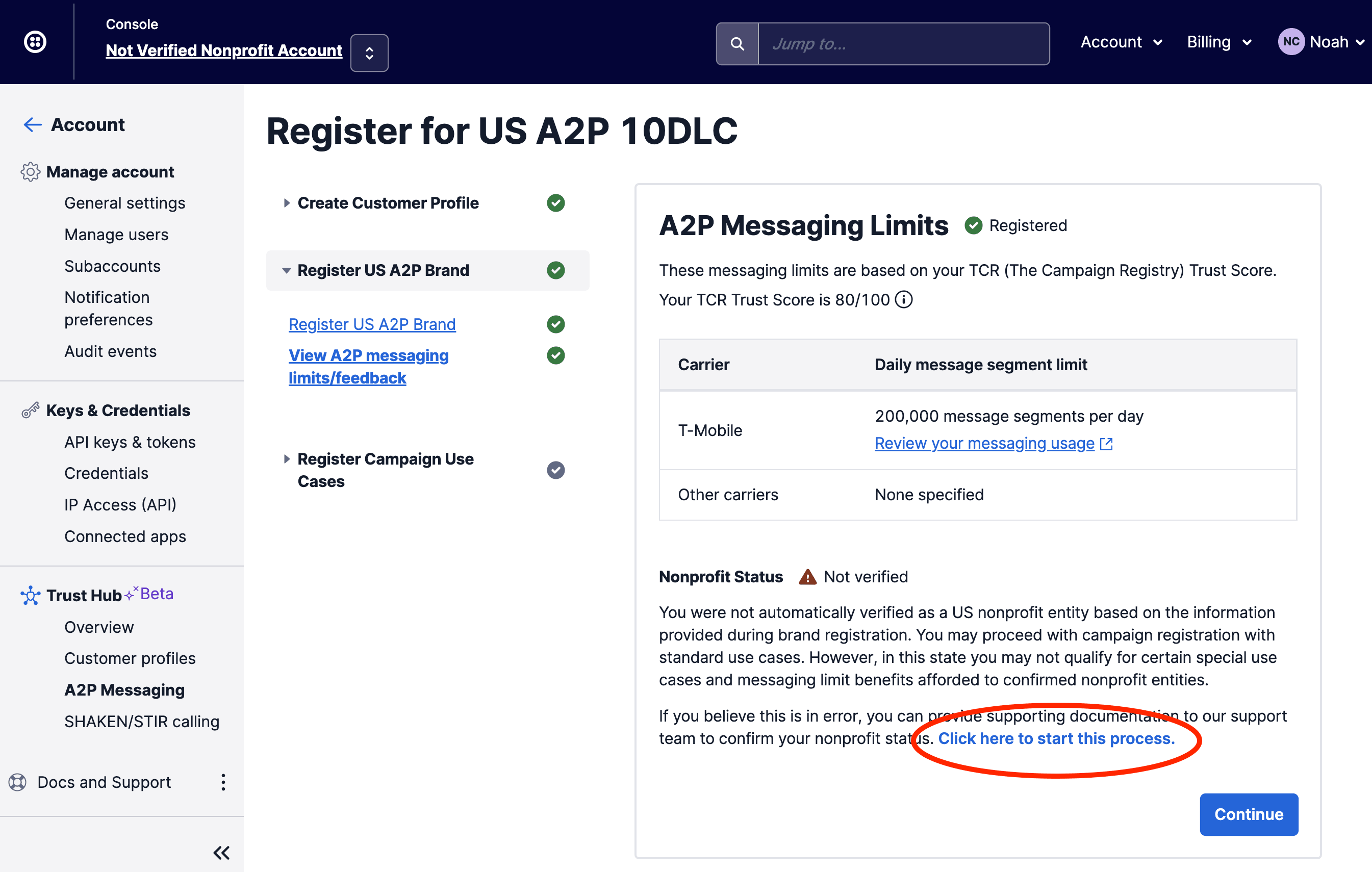
1. Create your customer profile. Twilio calls this Trust Hub. It's your business details: legal name, address, tax ID, website, and an authorised contact. Submit it once and it feeds everything after it.
2. Register your brand. The brand is your company as the carriers see it. Twilio passes it to The Campaign Registry, which checks your details against public business records. This usually comes back within hours.
Most businesses register as Standard. If you send fewer than about 3,000 messages a day you may qualify for Low-Volume Standard, which is cheaper and has the same approval path. If you have no EIN — a genuine sole trader — there's a Sole Proprietor route with lower limits; answer "no" to the tax ID question and Twilio routes you there.
3. Register your campaign. The campaign describes what you'll actually text people about. This is the slow step and the one that gets rejected, so take your time:
- Use case. Pick the one that matches what you'll send — customer care, account notifications, marketing, two-factor codes. Be honest; mismatched traffic gets your campaign suspended later.
- Description. Write two or three real sentences. "Appointment reminders and follow-up messages to customers who have booked a consultation with us" gets approved. "Notifications" does not.
- Sample messages. Write two you would genuinely send. Include your
business name in each, and end at least one with an opt-out line. Use
square brackets for anything that varies:
Hi [name], this is [Business] confirming your appointment on [date]. Reply STOP to opt out. - How people consent. Show where and how someone agrees to be texted — the URL of your form, or a screenshot showing the checkbox and its wording. Pre-ticked boxes and "we bought this list" will be rejected.
4. Attach your phone number. Once the campaign is approved, add the number to the Messaging Service Twilio created for it: open the Messaging Service, click Add Senders, and pick your number.
After approval
Send a real text to a real phone. If it arrives, you're done — there's nothing to change in Pepperwire, and your numbers keep working exactly as before.
Handling STOP and HELP
US carriers require that anyone can text STOP to opt out and HELP to find out who you are. Twilio handles both automatically on registered numbers: STOP stops further messages to that person, and any attempt to text them afterwards is rejected. You'll see that rejection as a failed message in Pepperwire, which is the system working correctly.
Don't try to work around an opt-out. It's the fastest route to a suspended campaign, and in the US it carries real legal exposure.
If your campaign is rejected
Rejections are common and usually fixable. The reasons, in the order we see them:
| Reason | Fix |
|---|---|
| Consent evidence is unclear | Link to the actual page with the opt-in checkbox, or attach a screenshot showing the exact consent wording |
| Sample messages are too vague | Rewrite them as real messages, with your business name and a STOP line |
| Website has no privacy policy | Publish one and resubmit. It has to be reachable without logging in |
| Business details don't match records | Use your exact registered legal name and address, not a trading name |
| Use case doesn't match the samples | Pick the use case that actually describes your messages |
Fix the flagged item and resubmit — you don't start over.
Toll-free numbers are a different path
If you use a toll-free number instead of a local one, you don't do A2P 10DLC. You do Toll-Free Verification, a separate form in the same part of the Twilio Console. It asks for much the same information and takes roughly the same time. Unverified toll-free traffic is blocked too.
What Pepperwire does about all this
We can't register on your behalf — the carriers require the business that's sending to register itself. What we do is stop it being invisible:
- Twilio's rejection reasons are shown in plain English on the Messages page rather than as an error code.
- The Phone numbers page reminds you about registration before you point a workflow at a number.
- The troubleshooting guide tells you when a failure is a registration problem rather than something you can fix by clicking around.
Still unsure whether registration is your problem? Email support@pepperwire.app with one of the phone numbers involved and roughly when you sent the message, and we'll look it up.