


Official HubSpot App Partner
Twilio SMS, right where you already work in HubSpot
Two-way texting in your inbox, one-off sends from contact records, and a real “Send SMS” workflow action. Every number, every user, every message — one flat price.
7-day free trial · no credit card · $29/month flat
Watch the whole setup, start to finish — 9 min 21 sec
Where it shows up
Three places in HubSpot, no fourth tool
Built on HubSpot’s newest platform APIs, so SMS appears inside the screens your team already has open — not in a side app they have to remember.
Inbox
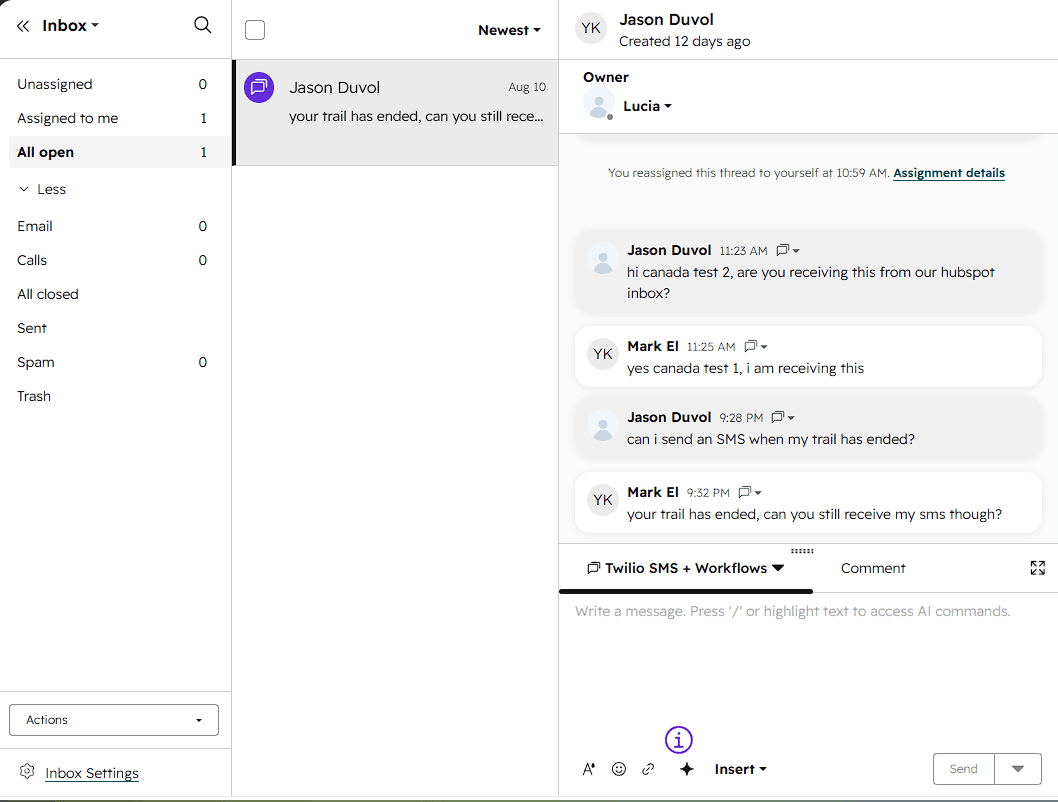
Texts land in the inbox your team already watches
An incoming SMS opens a real HubSpot conversation, in Inbox or Help Desk. Answer it in the same window you answer email in.
- Assignments, notes, and routing all come along
- Replies go back out over your Twilio number
- Inbox and Help Desk channels both supported
Contact records
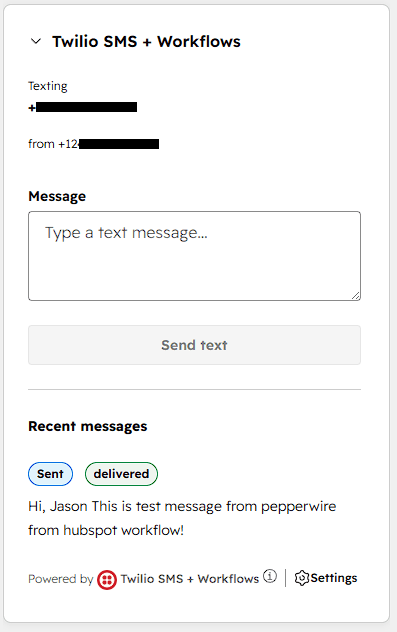
A send box on every contact record
One-off texts straight from the record you already have open — no tab switch, no copy-paste, no browser extension.
- Delivery state shown on the card itself
- Every message logged to the contact timeline
- Sends from the Twilio number you picked
Workflows
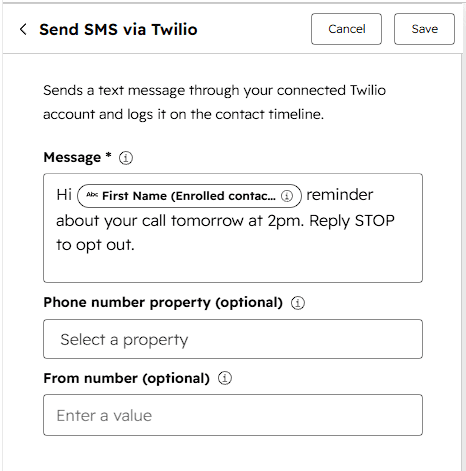
A real Send SMS workflow action
Deal reminders, review requests, no-show follow-ups — on autopilot from any HubSpot workflow. No Operations Hub, no custom code action.
- Pick which contact property holds the number
- Choose the sending number, or use your default
- Failures surface in HubSpot's own action log
Under the hood
Contacts match themselves
An incoming text finds the right contact by phone number, or creates one — nothing lands in a void.
Read the guideDelivery you can see
Sent, delivered, or failed: real Twilio status on every message, with a plain-English fix when one bounces.
Read the guideCompliance built in
A2P 10DLC readiness checks during setup and STOP/HELP handling, so your messages actually reach phones.
Read the guideConversations stay private
Every message is encrypted before it's written to our database — your customer conversations aren't sitting there in plain text for anyone to read.
Read the policySetup
Live in five minutes, not three weeks
No implementation call, no webhook copying, no professional services line on the invoice.
Install from the marketplace
One click from the HubSpot App Marketplace. No forms, no sales call, no onboarding fee.
Connect Twilio
Paste your Twilio API key and pick which numbers to bring in. A built-in checklist verifies they're ready to send.
Start texting
Texts flow into your inbox, contacts match automatically, and your workflows can send SMS. About five minutes, total.
Pricing
One price. However many numbers.
The existing Twilio apps for HubSpot average under 3.5 stars. We read every review and built the opposite — starting with the bill.
| You connect | Typical Twilio app | Pepperwire |
|---|---|---|
| 1 number | $49/mo | $29/mo |
| 3 numbers | $127/mo | $29/mo |
| 5 numbers | $205/mo | $29/mo |
| 10 numbers | $400/mo | $29/mo |
Typical pricing for comparable Twilio apps listed on the HubSpot Marketplace: $49/month plus $39 for every number after the first. No credit packs and no message caps on either side of this table — you pay Twilio directly for carriage, and we never mark up a message.
Pepperwire Plus
7-day free trialor $290/year — two months free
- Unlimited phone numbers
- Unlimited users and inboxes
- Unlimited messages — you pay only Twilio carriage
- Inbox + Help Desk channels
- Workflow SMS action with tokens
- Contact record sends and timeline logging
No credit card required. Requires HubSpot Sales or Service Hub Professional and a Twilio account.
Your customers text. Your HubSpot should too.
Install it, connect Twilio, and send your first message in about the time it took to read this page.
Install Pepperwire for HubSpotFive-minute setup · 7-day free trial · $29/month flat